An experienced CYBER SECURITY ANALYST dealing in transborder crimes on phones,computers,threat intelligence, bug hunting,.... White hat hacking and Repairing phones and reviewer of new technology gadgets
Friday, May 10, 2019
Monday, May 6, 2019
Thank you Major sankara...... The brother takes over!
Rwanda’s National Liberation Forces (FNL) has appointed Capt Herman Nsengimana as its spokesperson replacing Maj Calixte Sankara who is being held by Rwandan government.
In a statement sent to this website, FLN’s political wing said Major Calixte Nsabimana Sankara who was arrested by the Kigali regime services is unable to conduct his spokesperson duties.
“MRCD informs Rwandans, EAC, SADEC member states and the rest of the International Community that; effective from today, Captain Herman Nsengimana is the new FLN spokesperson” the statement said.
It added that Captain Nsengimana is a high caliber soldier, with a history of a very close working relationship with Maj Sankara; hence his designation is expected to not only fill Major Sankara’s shoes but also increase the struggle’s momentum and morale of its troops.
“We therefore request all patriotic Rwandans and all FLN sympathizers to rally behind him in the same impetus as that provided to our irreplaceable hero, Comrade Major Sankara”.
The statement signed by the MRCD president Paul Rusesabagina denounced the communiqué dated the 4th of May 2019 and circulated on social media, designating Captain Nahimana Straton as the new FLN spokesperson.
“It was a FALSE communiqué created by RPF agents in an attempt to mislead the public” Paul Rusesabagina added.
“With the appointment Captain Nsengimana, recent boost in our cadres and troop’s morale and the International Community response in regards to Major Sankara’s kidnap should serve as a strong message to General Paul Kagame and his oppressive regime that; Major Sankara’s patriotism and ideals are immortalized in the hearts of millions of Rwandans and beyond”.
Paul Rusesabagina called on Rwandans across the world and all sympathizers to continue their support to FLN’s armed struggle as the only way to defend Major Sankara’s cause and legacy.
Sunday, May 5, 2019
Google Chrome’s mobile browser has been targeted with a relatively simple phishing technique by developer Jim Fisher. According to Fisher, the exploit involves tricking victims into handing over their private information by manipulating the trusted websites of the user.
By using a combination of coding and screenshots, the victims can be easily deceived, explained Fisher in his personal blog post. The reason is a flaw identified in the mobile version of Chrome that lets hackers trick users into thinking that they are visiting an official or authentic website while in reality, it is the fake version that they are visiting.
This could be particularly worrying when a user is visiting the bank website as the information about the bank account number and password for online banking will be shared with the attacker.
See: Phishing Scams: 5 Excellent Tips That Will Protect You
Fisher has developed and disclosed a proof-of-concept too. However, so far there is no indication that the vulnerability has been exploited. Although the vulnerability is identified in Chrome at the moment, Fisher believes that other browsers may also be susceptible.
In new versions of Chrome for mobile devices, the address bar disappears when the user scrolls through the page so as to give the user extended display. What happens in this new wave of phishing attacks is that the attackers are exploiting this very feature of Chrome mobile browser. After the address bar is hidden, the hackers enable their own
fake version of the website along with an SSL badge to appear on the screen as soon as the user stops scrolling.
However, originally, the address bar doesn’t appear on its own. This is termed by Fisher as a scroll jail for users as there is page uploaded within a page. When the user tries to scroll back up to access the address bar, it doesn’t let them do so and hence, the user is trapped in a loop.
Fisher displayed how the trick worked in the proof-of-concept, where he can be seen changing the URL of his own website with that of HSBC Bank. To make the scam even more sophisticated, hackers can add coding.
The fix is not easy for this flaw and Chrome developers will have to think out-of-the-box to eradicate the issue given the interactive element involved. Fisher has dubbed this scam the “inception bar” and currently Android mobile users
By using a combination of coding and screenshots, the victims can be easily deceived, explained Fisher in his personal blog post. The reason is a flaw identified in the mobile version of Chrome that lets hackers trick users into thinking that they are visiting an official or authentic website while in reality, it is the fake version that they are visiting.
This could be particularly worrying when a user is visiting the bank website as the information about the bank account number and password for online banking will be shared with the attacker.
See: Phishing Scams: 5 Excellent Tips That Will Protect You
Fisher has developed and disclosed a proof-of-concept too. However, so far there is no indication that the vulnerability has been exploited. Although the vulnerability is identified in Chrome at the moment, Fisher believes that other browsers may also be susceptible.
In new versions of Chrome for mobile devices, the address bar disappears when the user scrolls through the page so as to give the user extended display. What happens in this new wave of phishing attacks is that the attackers are exploiting this very feature of Chrome mobile browser. After the address bar is hidden, the hackers enable their own
fake version of the website along with an SSL badge to appear on the screen as soon as the user stops scrolling.
However, originally, the address bar doesn’t appear on its own. This is termed by Fisher as a scroll jail for users as there is page uploaded within a page. When the user tries to scroll back up to access the address bar, it doesn’t let them do so and hence, the user is trapped in a loop.
Fisher displayed how the trick worked in the proof-of-concept, where he can be seen changing the URL of his own website with that of HSBC Bank. To make the scam even more sophisticated, hackers can add coding.
The fix is not easy for this flaw and Chrome developers will have to think out-of-the-box to eradicate the issue given the interactive element involved. Fisher has dubbed this scam the “inception bar” and currently Android mobile users
Monday, April 29, 2019
All East Africans using Facebook, Instagram,and emails are in danger of loosing their data
Facebook,Instagram and Google users are again at a risk of intrusion,.I have warned facebook.com and MTN Uganda over this security hole.. iqm Wondering how a local phone number sends a security verification code before Facebook sends it... I have been testing the security of my social media accounts and today I was shocked,a local phone number sent me a security verification code first and then Facebook sent the same code later!!! And I real know that this is very abnormal.... I have been alerting all telephone communication companies in East Africa about this insecurity!!! Citzens using phone numbers and email accounts are at a danger of loosing their data!!!! Something should be done to iron out this nonsense.....
Tommorow 01/05/2019 all phone numbers not verified and confirmed against NIN will be switched off!!!
As MTN Uganda tries to iron out all the shortcomings in the database of the registered phone numbers,it set tomorrow as the day all phone numbers not confirmed against the national Identity cards will be put off air!!! I applaud MTN Uganda for this,alot of issues have been unexplainable due to some of these dubiously registered numbers
Am now presenting you a way you can verify and confirm phone numbers registered on ,of and against your national ID
HERE WE GO
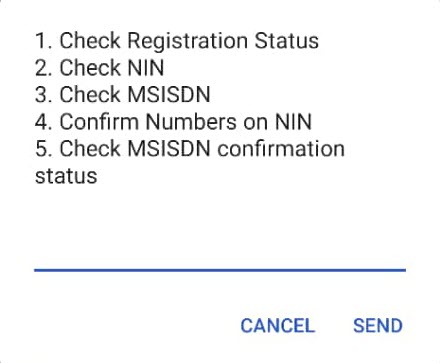
The code for confirming your registration is *197# and when you dial, it’ll give you the options below:

When you pick option 1, you’ll be able to know whether your number is registered.
But when you pick option 4, the following will appear.
It should be noted that by selecting option 1 (from above), you’ll verify MTN number(s) that are registered against your NIN.
When you select Option 2, you’ll remove numbers registered against your NIN one by one.
When you choose option 3, you’ll be able to add back numbers you might have removed accidentally.
If your identification details are not captured, visit any MTN Service Centre or Dduuka to verify all numbers registered against your NIN.
The numbers you remove from your NIN will be barred immediately and KYC details deleted. And those that you allow will take on the name on the National ID.
To see all numbers registered against your NIN, you’ll dial *197#, select option 2 and enter your NIN.
Citzens have done a great work in the arrest of an armed robber
Vigilant residents arrest armed man
Residents of Kiwatule this afternoon foiled an attempted robbery in Kiwatule after gunman entered Liquid Cash Emergency Loans with intent to rob.
The suspect, Isaac Mulengenyi, 23, reportedly fired in the air to scare onlookers however mob charged at him, arrested and handed him to police.
A case of aggravated robbery has been opened at Ntinda Police Station Vide CRB 123/2019 while a rifle has been recovered with nine rounds of ammunition.
The suspect is still being detained at Ntinda pending appearance before court.
Subscribe to:
Comments (Atom)
-
A new way for cybercriminals to create fake social media profiles and carry identity scams using Artificial Intelligence powered tool? A ...
-
The Democratic Republic of Congo (DRC) has long been a battleground for complex conflicts, driven by historical betrayals, foreign interfe...
-
After almost six decades with Heckler & Koch, the German Bundeswehr appears to have selected a new supplier for its assault rifle. A ...